Experiment JavaScript & Experiment CSS
In short
With Experiment JavaScript and Experiment CSS, you can deliver JavaScript and CSS code across all variations of an experiment, including the original. Experiment code is always executed before the code of the individual variations.
This is useful whenever code has to run identically for every visitor in the experiment, for example to load a tracking script on all variations. Experiment code is intended for experienced users with programming experience.
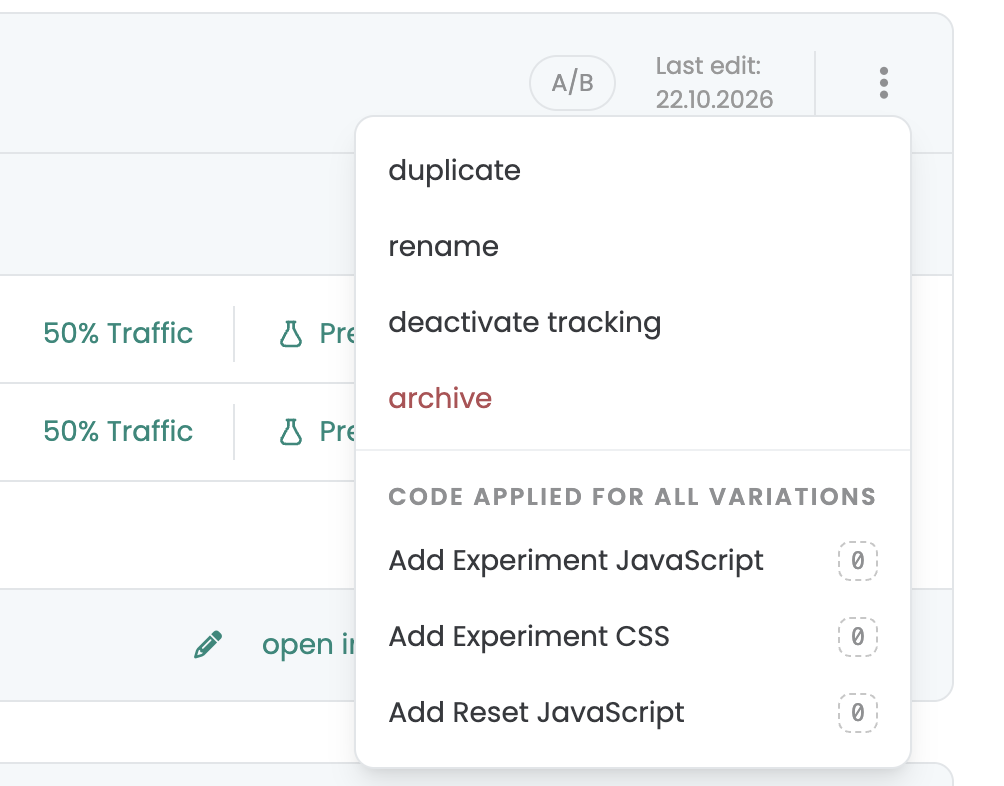
Where to find Experiment JS and Experiment CSS
You can find both functions in the experiment overview of your dashboard:
- Click the three-dot menu at the top right of the experiment.
- Under Code applied for all variations, select Add Experiment JavaScript or Add Experiment CSS.
- Enter your code and save it.
The badge next to each entry shows whether code has already been added.
How Experiment code works
- Delivered to every variation: Experiment code is applied to all variations of the experiment and to the original.
- Executed first: Experiment code is always executed before the variation code. Code or styles you add within a variation can therefore build on what Experiment code has already set up.
- Same code, same result for everyone: Because the code is delivered to all variations, it does not create a difference between them. Use it for things that should apply to everyone, and use the variation code (see Add JavaScript and Add CSS) for the changes you want to test.
Application examples
Run a tracking script on all variations
A typical use case for Experiment JavaScript is a tracking script that should be added to every variation. Instead of copying the script into each variation, you add it once as Experiment JavaScript.
// Runs on the original and on all variations
window.dataLayer = window.dataLayer || [];

window.dataLayer.push({
  event: 'experiment_loaded',
});
Share styles across all variations
With Experiment CSS, you can define styles that are needed in every variation, for example for an element that you add via JavaScript.
.promo-note {
  font-size: 14px;
  color: #333;
}
Using helper functions
The Varify helper functions also work in Experiment JavaScript. You can use them, for example, to wait for elements in the DOM or to prevent code from running in the editor. You can find all available functions and examples in the article Code Helpers.
window.varify.helpers.waitFor('.product', (element) => {
  // Runs as soon as the element is available in the DOM
});
Add JavaScript Reset
In the same menu, you will also find Add Reset JavaScript. It removes code that you have added, which is especially helpful for Single Page Applications. You can find more information in the article Add JavaScript Reset.