BigQuery integration in Varify
Step 1: Activate the function in Varify.io
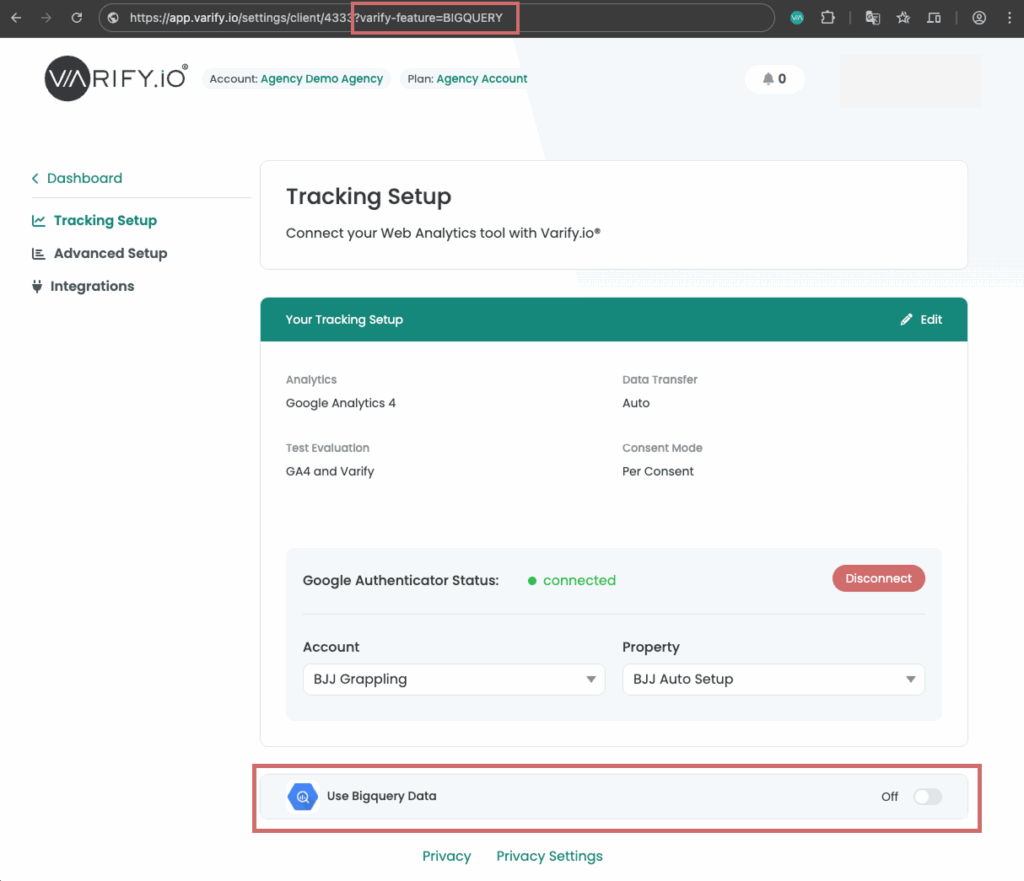
The use of BigQuery is currently not yet enabled for all users. However, you can easily activate it via a feature flag parameter. This is how it works:
- Open the tracking setup page
In your dashboard, go to the tracking setup page (under "Go to Tracking Setup") and then click on "Analytics Connection". - Add the feature flag parameter after your client ID
- Remove the part of your URL up to the client ID including the #:
(e.g. https://app.varify.io/settings/client/910#/analytics-connection) - Now add the following parameter: ?varify-feature=BIGQUERY
(e.g. https://app.varify.io/settings/client/910**?varify-feature=BIGQUERY**)
- Reload page
After adding the parameter and refreshing the page, the option to connect to BigQuery should be visible under Analytics Connection.
Connect Varify.io with BigQuery
Once you have activated the function via the feature flag, you can use it to its full extent.
Either connect an existing GA4 BigQuery project or create a new project with the one-click auto setup and connect it to Varify.
You can find detailed instructions on how to connect Varify with BigQuery here: To the instructions
All posts about BigQuery and Varify
In these articles, we will show you step by step how to link Varify with BigQuery to evaluate your experiments even more efficiently. If you have not yet created a BigQuery project, we will also guide you through the setup and connection with Google Analytics 4 (GA4). What is BigQuery? ** **
What is BigQuery?
Find out more about BigQuery and what the big advantage of the Google service is.Learn more Connect BigQuery with Varify ** **
Connect Varify with BigQuery
Connect Varify with BigQuery and analyze your experiments with raw data.Learn more Set up BigQuery project ** **
**Set up cost control
**Keep an eye on possible costs for BigQuery by setting up a cost control.Learn more Project and report options ** **
What is BigQuery?Find out more about BigQuery and what the big advantage of the Google service is.
Create BigQuery project manuallySimply create a new BigQUery project in just a few steps.
Set up cost controlKeep an eye on possible costs for BigQuery by setting up a cost control.
Connect Varify with BigQueryConnect Varify with BigQuery and analyze your experiments with raw data.
Connect Varify with BigQueryConnect Varify with BigQuery and analyze your experiments with raw data.