Anti flicker script
In short
The anti-flicker script can be used to prevent the typical phenomenon of flickering during A/B testing. This script can optionally be integrated before the Varify.io® code snippet.
What is flickering?
In an A/B or redirect test, the webpage is first loaded without any changes. The variant then modifies the webpage. When the variant is displayed, users may experience a „flickering“ effect.
Such page flickering can be prevented by an anti-flicker script.
Integrate Anti Flicker Script
Anti-flicker script code
You can copy the anti-flicker script directly from here and integrate it into your website.
.varify-antiflicker{opacity:0 !important} (function (n,o, f,l,i,c,k,e,r) { var z = n.classList;z.add(o);setTimeout(()=>z.remove(o),f) }(document.documentElement, 'varify-antiflicker', 4000));
`
<style>.varify-antiflicker{opacity:0 !important}</style>
<script>(function (n,o, f,l,i,c,k,e,r) {
  var z = n.classList;z.add(o);setTimeout(()=>z.remove(o),f)
}(document.documentElement, 'varify-antiflicker', 4000));</script>
`
Where should the anti-flicker script be placed?
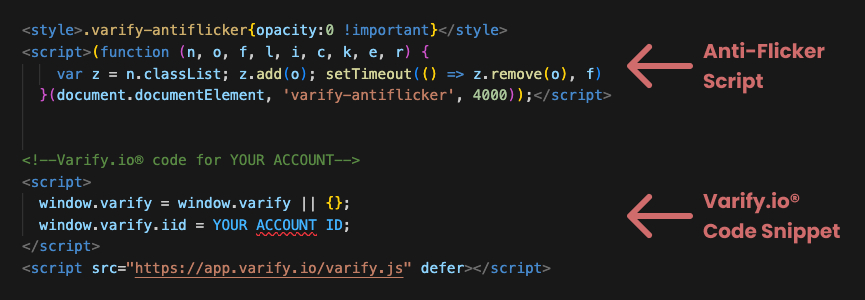
The anti-flicker script must be integrated into your website, just like the Varify.io® code snippet. For the script to work, it must be placed above the already integrated Varify.io® code snippet.
Advantages and disadvantages of the anti-flicker script
| Advantage | Disadvantage |
|---|---|
| No side flickering****Improved user experience: Less user distraction due to flickeringLower bounce rate: Pages without flickering tend to have a higher engagement rate | Possible negative effect on Core Web Vitals: Extended loading time of the website |
Technical explanation
The anti-flicker script ensures that the page is hidden until Varify provides feedback as to whether a variant has been played or whether a variant should be played.
As long as the variation has not been fully loaded, the website is hidden and the user only sees a white background.
As soon as the variant has been fully loaded, the script displays the loaded page.
Hiding usually takes place within a few milliseconds, so that the user normally does not notice anything.
The script hides the page for a maximum of 4 seconds. The website is then displayed, even if the variant has not yet been fully retrieved from the server. The value of 4 seconds can also be replaced by a longer or shorter time in the script.